
The Extension Framework Explained
The Sugar Extension Framework: Build Upgrade-Safe Customizations That Survive Every Release
Prerequisite: Layouts and Views | Part II
Editor’s Note (July 2026): Since this article was originally published, I’ve created the Sugar Developers Guide Examples GitHub repository. The complete source code for this article is now available there. You’ll find the link near the end of this post.

Introduction
In the previous article, we explored how Sidecar powers Sugar’s user interface. But before Sidecar can render a field, register a button, or execute client-side logic, Sugar first has to discover those components.
That’s the job of the Extension Framework.
Rather than modifying core files directly, developers place isolated source files under custom/Extension, and Sugar automatically compiles and merges them into the runtime during a Quick Repair and Rebuild (QRR). This architecture keeps customizations modular, upgrade-safe, and easy to maintain, even when multiple developers are working simultaneously or the platform is upgraded.
In this article, we’ll examine how the Extension Framework works, explain the most common mistake developers make with custom fields, and show how to structure extensions that compile cleanly and survive future Sugar releases.
Understanding the Extension Architecture
Most Extension customizations follow a simple rule: You write the source files, and Sugar compiles the runtime.
## Understanding the Extension Architecture

Most Extension customizations follow a simple rule: you write the source files, and Sugar compiles them into optimized runtime files.

Developer
      │
      ▼
custom/Extension
      │
      ▼
Quick Repair & Rebuild (QRR)
      │
      ▼
Sugar Extension Compiler
      │
      ▼
Compiled *.ext.php Files
      │
      ▼
Runtime
Instead of scanning hundreds or even thousands of individual extension files on every request, Sugar compiles them into a small number of optimized runtime files. This reduces filesystem overhead, improves application performance, and allows developers to keep their customizations modular without sacrificing efficiency.
Crucial Rule: Never edit compiled
*.ext.phpfiles by hand. Any changes made directly to those files will be completely overwritten and destroyed the next time you run a Quick Repair and Rebuild (QRR).
Common Extension Directories
Ext/Vardefs/: Adding fields, overriding properties, relationships, and indexes.
Ext/LogicHooks/: Registering synchronous or asynchronous backend logic hooks.
Ext/Language/: Adding custom UI labels or application-wide dropdown strings.
Ext/Layoutdefs/: Controlling subpanel layouts and visibility.
Ext/Administration/: Injecting custom links and sections into the Admin panel.
Ext/Include/: Registering new custom modules and beans into the system.
Critical: Custom Fields Are NOT Plain Extension Vardefs
If you take only one thing away from this article, let it be this: Writing a plain vardef array definition with a _c suffix does not create a Studio-compliant custom field. This is easily the number one mistake made by developers transitioning into the Sugar ecosystem.
The Naive Mistake
<?php
// ❌ This does NOT correctly create a custom field on Contacts
$dictionary['Contacts']['fields']['custom_priority_c'] = [
    'name' => 'custom_priority_c',
    'type' => 'enum',
    'options' => 'contact_priority_list',
];
If you deploy the code snippet above, Sugar will attempt to add the column directly to the core contacts table during a QRR rather than the proper custom table (contacts_cstm). Furthermore, because it skips registration in the fields_meta_data table, it won’t appear in Studio and will lead to highly unpredictable behavior.
How Sugar Fields Actually Sync
fields_meta_data (database source of truth)
        │
        ▼
DynamicField::buildCache()  →  Appends 'source' => 'custom_fields' metadata
        │
        ▼
Maps column to contacts_cstm.custom_priority_c
        │
        ▼
Generates custom/Extension/.../Ext/Vardefs/sugarfield_custom_priority_c.php
The Golden Rule: If a field needs to live in the {module}_cstm table and be accessible via Studio, it must have a corresponding row record in fields_meta_data.
Three Approaches to Defining Fields
Approach A: Studio (The Recommended Path)
Admin → Studio → Contacts → Fields → Add Field
Whenever possible for built-in modules, let Studio do the heavy lifting. It automatically provisions the entry in fields_meta_data, injects the database column into _cstm, creates the correct sugarfield_*.php extension file, and sets up your language labels without you needing to write a single line of PHP.
Approach B: Module Loadable Packages (MLP)
When distributing a custom field within a package, you don’t use raw installer scripts or handle database column generation manually. Instead, you declare the field structure inside the package’s manifest.php and map it to a clear metadata file.
Module Loadable Packages are the preferred way to distribute customizations between environments because Sugar handles metadata registration, database changes, and installation automatically.
Your package structure should include:
Manifest Definition: manifest.php
<?php
$manifest = [
    'acceptable_sugar_versions' => ['regex_matches' => ['26\..*']],
    'acceptable_sugar_flavors' => ['PRO', 'ENT', 'ULT'],
    'author' => 'Amaiza',
    'description' => 'Adds support priority custom field to Contacts',
    'icon' => '',
    'is_uninstallable' => true,
    'name' => 'Contact Priority Extension',
    'published_date' => '2026-07-16',
    'type' => 'module',
    'version' => '1.0.0',
];

$installdefs = [
    'id' => 'contact_priority_mlp',
    'custom_fields' => [
        [
            'name' => 'custom_priority_c',
            'label' => 'LBL_CUSTOM_PRIORITY',
            'type' => 'enum',
            'ext1' => 'contact_priority_list',
            'default_value' => '',
            'require_option' => 0,
            'audited' => true,
            'module' => 'Contacts',
            'massupdate' => 0,
            'duplicate_merge' => 0,
            'reportable' => 1,
            'importable' => true,
        ],
    ],
    'language' => [
        [
            'from' => '<basepath>/Extension/modules/Contacts/Ext/Language/en_us.custom_priority.php',
            'to_module' => 'Contacts',
            'language' => 'en_us',
        ],
    ],
];
Language Label Source: Extension/modules/Contacts/Ext/Language/en_us.custom_priority.php
<?php

$mod_strings['LBL_CUSTOM_PRIORITY'] = 'Support Priority';
When this zip package is uploaded via Module Loader, Sugar safely interprets the instructions, registers the field metadata automatically, and seamlessly executes the backend database layout optimizations during the installation process.
Approach C: Raw Extension Vardefs (Specific Use Cases)
Hand-authored Vardef extensions are appropriate, but generally only for modifying core platform behaviors or structural properties rather than building brand-new database columns from scratch:
Overriding properties: Changing an out-of-the-box field to be audited.
Adding indexes: Providing a composite index for complex, heavy queries.
Establishing relationships: Building links or relationship maps between modules.
Example: Overriding a Core Field Property
File: custom/Extension/modules/Contacts/Ext/Vardefs/audit_core_field.php
<?php

// Safely toggle a core framework field property to track changes
$dictionary['Contact']['fields']['phone_office']['audited'] = true;
When you run a Quick Repair and Rebuild (QRR), Sugar scans this file and merges your property adjustment directly into the compiled vardefs.ext.php file for the Contacts module, keeping your override completely safe from future core updates.
Registering Logic Hooks via Extensions
To create a clean backend process hook, register your definition in the corresponding module directory:
File: custom/Extension/modules/SchedulersJobs/Ext/LogicHooks/job_failure.php
<?php

$hook_array['job_failure'][] = [
    120,
    'job failed',
    null,
    'Sugarcrm\\Sugarcrm\\custom\\modules\\SchedulersJobs\\LogicHooks\\SchedulersJobsLogicHooks',
    'sendJobFailureNotification',
];
Breaking Down the Hook Array
To understand exactly how Sugar parses this definition, it helps to map out what each array position controls:
Position 1 (120): The processing order index. If multiple hooks are registered to the same event, they execute sequentially from lowest to highest numerical order.
Position 2 (’job failed’): A clean string label identifier for the hook, useful for logging and debugging.
Position 3 (null): The path to the PHP implementation file. Since we are using an autoloaded class definition, this can safely remain null.
Position 4 (’Sugarcrm\...’): The fully qualified, namespaced class name containing your execution logic.
Position 5 (’sendJobFailureNotification’): The exact target method name inside that class to execute when the event fires.
The actual logic implementation class should be isolated in its own file under custom/modules/SchedulersJobs/LogicHooks/SchedulersJobsLogicHooks.php. Running a QRR compiles your individual file seamlessly into logichooks.ext.php.
Developer Naming Checklist
🟢 DO:
Descriptive filenames: Use highly isolated, clear names like contact_priority_field.php or payment_validation_hooks.php.
Single concern: Focus entirely on one specific feature or architectural responsibility per extension file.
Timestamp awareness: Rely on the framework’s native tracking; Sugar automatically monitors file creation and updates to generate orderMapping.php to manage execution consistency.
🔴 DON’T:
Generic nomenclature: Avoid ambiguous filenames like 1.php or custom.php.
Arbitrary numbering: Do not rely on numeric prefixes like 01_... to force loading order, as modern Sugar versions ignore alphabetical sorting in favor of the timestamp mapping engine.
Compiled modifications: Never touch or edit raw .ext.php files directly within your repository tree.
Monolithic files: Do not bundle completely unrelated fields, logic hooks, and language translations into a single file.
Application-Level Extensions
The framework isn’t limited to individual modules; you can also hook directly into core system-level definitions.
Registering a Brand New Custom Module
File: custom/Extension/application/Ext/Include/amaiza_Substack.php
<?php
$beanList['amaiza_Substack'] = 'amaiza_Substack';
$beanFiles['amaiza_Substack'] = 'modules/amaiza_Substack/amaiza_Substack.php';
$modules_exempt_from_availability_check['amaiza_Substack'] = 'amaiza_Substack';
Injecting a Custom Link into the Admin Panel
File: custom/Extension/modules/Administration/Ext/Administration/amaiza_Substack.php
<?php

// Reset the option list for this section.
// Sugar builds each admin panel section with its own $admin_option_defs array.
$admin_option_defs = [];

// Register one admin link under the "Amaiza" group inside this section.
// The inner key (amaiza_Substack_Launcher) is the unique link ID used by Sugar.
$admin_option_defs['Amaiza']['amaiza_Substack_Launcher'] = [

    // [0] Legacy BWC icon image name (without .gif).
    // Used by classic Backward Compatibility (BWC) admin rendering via SugarThemeRegistry::getImage().
    'Administration',

    // Sidecar/modern UI icon class (sicon-*). Used by the current Administration page.
    'icon' => 'sicon-process-definitions-lg',

    // [1] Link title label key. Translated from Administration language strings.
    'LBL_AMAIZA_SUBSTACK_LAUNCHER_TITLE',

    // [2] Link description label key shown under the title.
    'LBL_AMAIZA_SUBSTACK_LAUNCHER_DESC',

    // [3] Link URL/action.
    // Can be a route, index.php URL, javascript navigation, or external URL.
    'https://substack.com',

    // [4] Optional warning flag. When set, classic BWC UI renders the title in red.
    // Use null when this link is not a warning/alert item.
    null,

    // [5] Optional onclick handler for custom client-side behavior.
    // Example for Sidecar routing:
    // 'javascript:void(parent.SUGAR.App.router.navigate("YourModule/layout/launcher", {trigger: true}));'
    null,

    // [6] Link target window. Common values: '_self' (same tab) or '_blank' (new tab).
    '_blank',
];

// Append a new section card to the Administration page.
// $admin_group_header is loaded from modules/Administration/metadata/adminpaneldefs.php
// and then extended by files in custom/Extension/modules/Administration/Ext/Administration/.
$admin_group_header[] = [

    // [0] Section header/title label key.
    'LBL_AMAIZA_SUBSTACK_SECTION_HEADER',

    // [1] Optional extra header text passed to get_form_header() in classic BWC mode.
    '',

    // [2] Whether to show help text in classic BWC header rendering.
    false,

    // [3] The links for this section (the $admin_option_defs structure defined above).
    $admin_option_defs,

    // [4] Section description label key shown below the section title.
    'LBL_AMAIZA_SUBSTACK_SECTION_DESCRIPTION',
];
Module Language Override Source:
<?php
$mod_strings['LBL_AMAIZA_SUBSTACK_SECTION_HEADER'] = 'Amaiza Publishing Platform';
$mod_strings['LBL_AMAIZA_SUBSTACK_SECTION_DESCRIPTION'] = 'Example custom Administration section for publishing integrations.';
$mod_strings['LBL_AMAIZA_SUBSTACK_LAUNCHER_TITLE'] = 'Substack Core Dashboard';
$mod_strings['LBL_AMAIZA_SUBSTACK_LAUNCHER_DESC'] = 'Access internal system utilities and publish directly to the Substack pipeline.';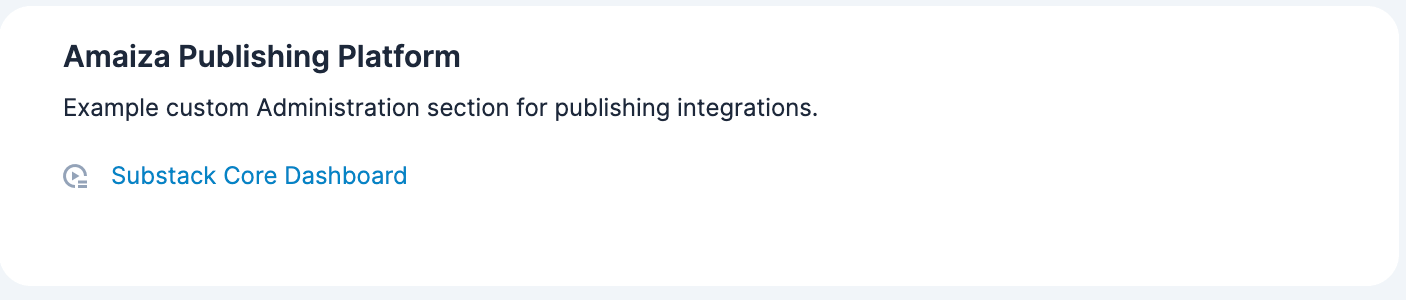
Troubleshooting Common Framework Issues
Symptom: Field does not show up in Studio or the Database.
Fix: You likely forgot to run a Quick Repair and Rebuild. Execute the QRR and verify any pending database sync SQL statements at the bottom of the page.
Symptom: The field was added to the main module table instead of the custom _cstm table.
Fix: You wrote a plain extension vardef array definition instead of utilizing Studio or a Module Loadable Package with the custom_fields directive.
Symptom: A custom Logic Hook isn’t executing.
Fix: Inspect the compiled logichooks.ext.php file to verify your pathing, sorting order, and array mapping. Ensure your target hook class file is properly named and placed.
Symptom: Changes aren’t taking effect after editing an extension.
Fix: Delete
cache/modules, run Quick Repair and Rebuild, and clear browser cache if you’re working with Sidecar metadata.
Symptom: The user interface outputs raw uppercase language keys like LBL_MY_FIELD_KEY.
Fix: The translation string hasn’t been compiled yet. Run a QRR and double check your language path structure under the Ext/Language/ directory.
Key Takeaways
Building complex features on top of Sugar requires respecting the compilation boundaries of the application:
The custom/Extension/ directory is your development playground.
The compiled paths are Sugar’s territory. Keep out of them!
Keep your files small, named properly, and upgrade-safe.
Rely on the framework’s native tracking instead of arbitrary numbering, letting Sugar manage execution consistency via the automatically generated orderMapping.php file.
Once you understand the Extension Framework, you’ll rarely need to modify a core Sugar file again. Nearly every customization, from fields and logic hooks to language strings and administration pages, can be implemented through extensions that remain isolated, maintainable, and upgrade-safe.
In our next article, we’ll dive even deeper into the database layer with a comprehensive look at Vardefs Part II, exploring _cstm optimization, relationships, and index construction strategies.
📦 Source Code
The complete, working examples for this article are available in the Sugar Developers Guide Examples repository.
View the code on GitHub